Yes, for the thinking and writing half of SEO, and no for the numbers. ChatGPT is good at grouping keywords by intent, writing briefs, drafts, titles and schema, and finding patterns in a Search Console export you upload. It cannot see search volumes, rankings or backlinks on its own, and when asked it will often invent them. The fix is to give it real data: upload exports, or connect an official app such as Semrush or Ahrefs. And if what you meant was "a tool that gets my site recommended by ChatGPT", that is a different job, covered in the second half of this guide.
By Yaniv Mizrahi, founder of TalkGenAI. We make an SEO writing tool that can be driven from AI assistants, so we say where it fits and where it does not. Facts about ChatGPT, OpenAI, Semrush and Ahrefs were checked on their own pages on 15 October 2026.
What does "ChatGPT SEO tool" mean?
People use the phrase for two different jobs, and most pages on the topic mix them up:
| You want to | What you need | Read |
|---|---|---|
| Do SEO work faster with ChatGPT | ChatGPT plus your real data (exports or apps) | The next four sections |
| Get your brand named and linked in ChatGPT answers | Crawlable pages, answer-first writing, mentions on other sites, and a way to measure | How do I get ChatGPT to recommend my site? |
Most businesses need both, in that order: use ChatGPT to produce better pages faster, and those pages are what ChatGPT later cites.
What are the best ChatGPT SEO tools?
The useful ones fall into four groups: data you feed ChatGPT, SEO apps that connect to it, trackers that check what it says about you, and tools that turn its output into published pages. Checked on each vendor's own page on 15 October 2026:
| Tool | What it adds to ChatGPT | Cost or requirement |
|---|---|---|
| Search Console and GA4 exports | Your real clicks, positions and AI visits, as a CSV to upload | Free |
| Semrush app | Keyword, domain and competitor data | A Semrush account |
| Ahrefs app (MCP) | Keywords, backlinks and site data | Ahrefs Lite or higher |
| Serpstat SEO Tool | Keyword volume and difficulty, domain and backlink metrics | A custom GPT; 7-day free access |
| Surfer MCP | Scores and optimizes a draft against the pages that rank | Beta since August 2026, Surfer's higher plans |
| Search Console connectors | Live Search Console data inside the chat | Third-party MCP servers; you grant them access |
| Mention trackers | Whether ChatGPT names you for buyer questions | From $29 a month (Otterly.AI, 15 questions) |
| TalkGenAI | Writes the article and saves it as a draft on your site | 3 articles free; not yet tested from ChatGPT |
- Start free: ChatGPT plus your own exports covers most day-to-day SEO work. The prompts below are built for that.
- Add one data app if you need search volumes, backlinks or competitor numbers, and pick the one you already pay for. Every app above reads data; none of them changes your site.
- Trackers answer a different question (does ChatGPT recommend you?). Our LLM SEO tools comparison compares Profound, Peec AI, Otterly.AI, LLMrefs and the Semrush and Ahrefs add-ons with prices.
What can ChatGPT do for SEO on its own?
On its own, ChatGPT knows language and how search works in general. It does not know your site's numbers. That splits SEO tasks cleanly:
| Task | On its own | Why |
|---|---|---|
| Group keywords by search intent | Good | Pure language work |
| Brief and outline for a topic | Good | Better if you paste the top results |
| First draft in your voice | Good, with examples of your writing | Generic without them |
| Titles, meta descriptions, FAQ and JSON-LD schema | Good | Give it the character limits |
| Regex for Search Console filters | Good | Test the pattern before trusting it |
| Search volume and keyword difficulty | Fails | It has no keyword database and guesses |
| Your current rankings and clicks | Fails | It cannot see your Search Console |
| Backlinks and competitor traffic | Fails | Needs a crawler's index |
| Facts, prices and dates in a draft | Risky | Check each one at the source |
With search turned on, ChatGPT can read live pages, which helps for "what do the top results cover?". It still cannot see Google's ranking order the way a rank tracker does, so treat its view of "the top results" as a sample.
How do I give ChatGPT real SEO data?
Three ways, from free to paid:
1. Upload exports (free, any plan with file uploads). Export a CSV from Search Console (Performance → Export), from Google Analytics, or from any keyword tool, and attach it to the chat. ChatGPT runs Python on the file, so it can sort, filter and chart it instead of reading it by eye. This is the safest option because the numbers come from your tools and nothing is connected to your accounts.
2. Official apps inside ChatGPT. Two big SEO tools have their own:
| App | What it reads | What you need |
|---|---|---|
| Semrush | Keyword, domain and competitor data from your Semrush account | A Semrush account; launched December 2025 |
| Ahrefs | Keywords, backlinks, site data through the Ahrefs MCP server | Ahrefs Lite or higher; each call uses at least 50 API units (Lite has 200,000 a month) |
Both read data; neither changes your site. In July 2026 OpenAI renamed its app directory to the Plugin Directory (chatgpt.com/plugins), so older guides may call these "connectors" or "apps". The 2023 ChatGPT plugin store is gone, and lists that still recommend its plugins are out of date.
3. Custom connectors (MCP). Any tool with a remote MCP server can be added in ChatGPT's developer mode, which is in beta and available on paid plans (workspace admins can turn it off). There is no official Google Search Console app in ChatGPT as of this writing; third-party connectors exist, but they ask for access to your Search Console data, so read who runs the server before you connect it. If you prefer not to, the CSV export in option 1 gives ChatGPT the same numbers.
A ChatGPT SEO workflow that does not invent numbers
The rule behind every prompt below: the numbers come from a file or an app, and ChatGPT does the reasoning. Each prompt says so, which stops it from filling gaps with guesses.
Prompt 1. Find pages that are close to page one. Attach a Search Console export with queries and pages for the last 3 months.
I attached my Google Search Console export (queries, pages, clicks, impressions, CTR, position). Use only the numbers in the file. Find queries with position between 5 and 15 and at least 100 impressions. Group them by page. For each page, list the queries, total impressions, and one specific change to the page that could move it up. Return a table sorted by impressions.
Prompt 2. Group a keyword list by intent. Attach an export from Semrush, Ahrefs or any keyword tool, or use the Semrush app.
Group these keywords by search intent: learn, compare, buy, or do-it-myself. Keep the search volume from the file next to each keyword; do not estimate any number. Then suggest one page per group, with the main keyword and the 3 to 5 keywords it should also cover.
Prompt 3. Brief from the pages that rank. Turn search on.
Search for "[keyword]" and read the top 5 results that are articles (skip ads, forums and videos). List what every one of them covers, what only one or two cover, and what none answer well. Then write a brief: the reader's question, a one-sentence answer, the H2s as questions, and the facts I need to check myself before publishing.
Prompt 4. Audit one page against its query. Paste your page's text or URL.
This page targets "[query]". Read it as a searcher who typed that query. Does the first paragraph answer the question directly? Which questions a searcher would have are missing? Which sentences are vague and need a number, a name or an example? Give me a list of edits, most important first. Do not rewrite the page.
Prompt 5. Titles and meta descriptions with limits.
Write 5 title tags (max 60 characters) and 5 meta descriptions (max 155 characters) for this page. Put the main keyword "[keyword]" near the start of the title. Show the character count after each one. No clickbait and no year unless the page has one.
Prompt 6. FAQ schema from the page itself.
From the page text I pasted, pick the 4 questions it answers most clearly. Write FAQPage JSON-LD using only answers that appear in the text, word for word or close to it. Do not add questions the page does not answer.
After the prompts, two checks stay human: verify every fact, price and date in a draft against its source, and read the result as a customer before it goes live. Google's guidance is that AI-written content is fine when it is helpful, but mass-producing pages mainly to rank breaks its spam policy on scaled content abuse.
Where does ChatGPT go wrong as an SEO tool?
- Invented numbers. Ask "what is the search volume of X?" without data and you often get a confident figure. Prompts 1 and 2 above avoid this by naming the file as the only source.
- Old facts. Without search turned on, ChatGPT may describe a tool, a price or a Google update as it was months ago. This is how many "ChatGPT SEO" lists still recommend plugins that were shut down in 2024.
- Same-as-everyone drafts. A draft written from the top results repeats the top results. Your own data, cases and opinions are what make a page worth citing, so put them in the prompt.
- The last mile is manual. ChatGPT writes text; you still format it, add images, fill the meta fields and publish. Tools that publish for you exist (see below), but check what they publish and to where.
How do I get ChatGPT to recommend my site?
This is the other meaning of "ChatGPT SEO tool". ChatGPT answers from what its search systems can fetch, so the work is to be fetchable, be the clearest answer, and be mentioned by others. The short version is below; our LLM SEO guide goes deeper, page by page.
- Allow OAI-SearchBot. OpenAI's documentation says sites that block OAI-SearchBot in robots.txt "will not be shown in ChatGPT search answers", and that a robots.txt change can take about 24 hours to apply. Blocking GPTBot only opts you out of model training and does not remove you from search answers; the two are separate. Check your robots.txt and any firewall bot settings, since some hosting setups block AI crawlers by default.
- Make sure Bing knows your pages. ChatGPT's search draws on third-party search providers, and Bing is the one most often named. Verify your site in Bing Webmaster Tools and submit your sitemap; it costs nothing.
- Answer first. Put a direct, quotable answer in the first paragraph under each question heading, the way this page does. Pages that bury the answer under an introduction are harder to quote.
- Get mentioned elsewhere. Studies of ChatGPT citations from Ahrefs, Similarweb and Profound disagree on whether Reddit or Wikipedia is cited most, but agree that a large share of citations go to third-party pages: forums, reviews, lists and comparisons. Being named there counts, not just your own site.
- Measure visits, not only mentions. In Google Analytics 4, open Traffic acquisition and look for chatgpt.com as a session source, with landing page as a second dimension.
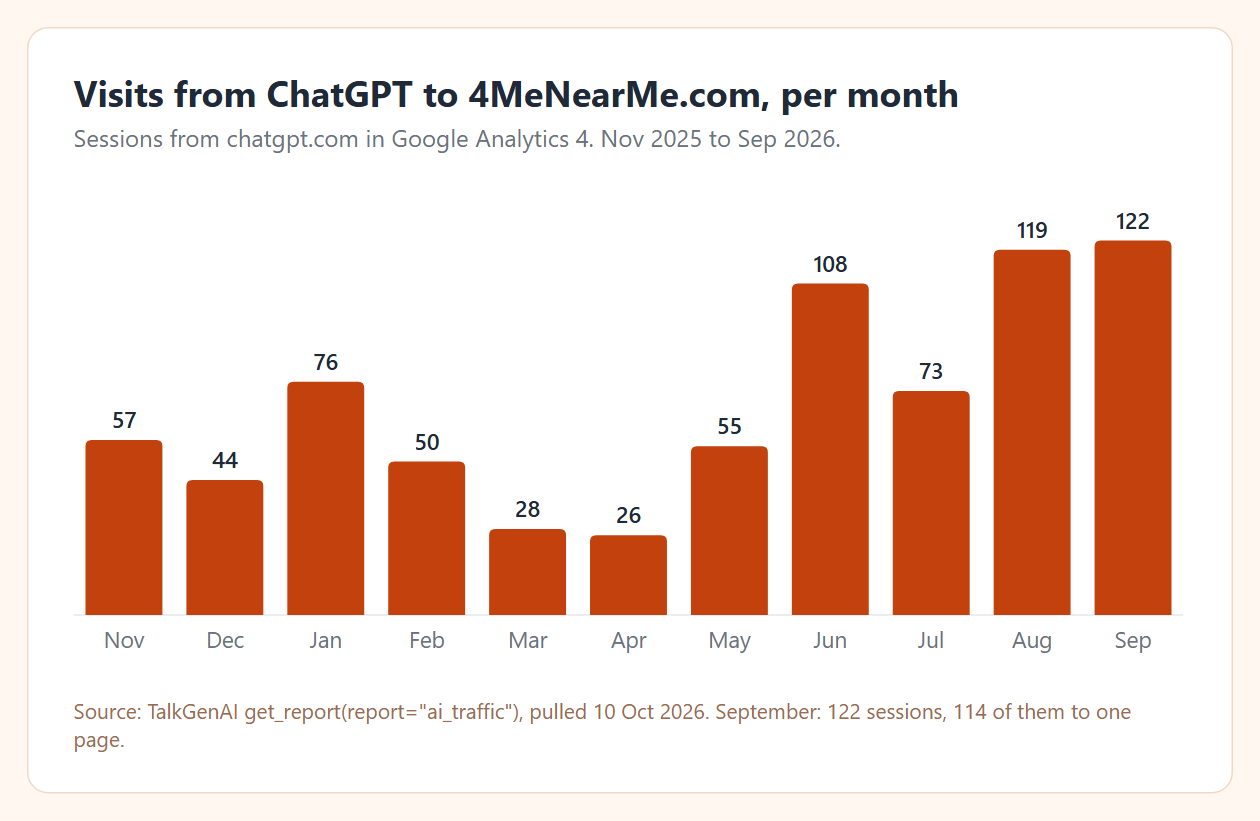
What measuring showed us: on 4MeNearMe.com, ChatGPT sessions went from 57 in November 2025 to 122 in September 2026, with dips in between, and 114 of those 122 went to a single page, a time zone tool. It is still small: under 1% of the site's traffic. In a separate test of 40 buyer questions for one brand, ChatGPT named the brand 8 times but linked to it only once. Being mentioned and being visited are different results, which is why our LLM SEO tools comparison separates mention trackers from traffic analytics.
Where does TalkGenAI fit?
TalkGenAI covers the writing and publishing part. It writes the article from your business details and brand voice, adds an image, FAQ schema and meta fields, and saves it as a draft on your WordPress or Webflow site for you to review. Its AI Visibility tab then shows, page by page, Google position next to visits from ChatGPT and other assistants (it needs a connected GA4 property and a paid plan).
You can run it from the dashboard or from an AI assistant over MCP. We have tested the MCP server with Claude, Claude Code and Cursor. ChatGPT's developer-mode connectors use the same MCP standard, but we have not finished testing TalkGenAI there, so we do not claim it yet.
What TalkGenAI does not do: it has no keyword database of its own like Semrush or Ahrefs, and its prompt tracker ("Who Mentions You") is invite-only. If you need volumes and backlinks, use one of the apps above alongside it.
Which ChatGPT SEO setup should I use?
| Your situation | Start with |
|---|---|
| No budget | ChatGPT plus Search Console and GA4 exports, prompts 1 to 6 |
| You already pay for Semrush or Ahrefs | Its official app in ChatGPT, so volumes come from real data |
| You want ChatGPT to cite you | Check robots.txt for OAI-SearchBot, submit to Bing, rewrite key pages answer-first |
| You know what to write but have no time to produce it | A writer that publishes drafts, then measure the new pages in GA4 |
| You need to know what ChatGPT says about you in answers without clicks | A mention tracker; see the LLM SEO tools comparison |
What are the limits of this guide?
ChatGPT's features, plan limits and menus change often; the directory was renamed in July 2026 and the location of developer mode has moved more than once. Semrush, Ahrefs, Serpstat and Surfer details were read from their own pages on 15 October 2026 and can change; Surfer's MCP is in beta, and Serpstat's tool is a custom GPT, so check that it still runs before you rely on it. Our traffic numbers come from one site and one brand test, so they show that mentions and visits can differ, not by how much they differ for you. Citation studies measure different things over different samples, which is why we do not quote a single "share of citations" figure.
Try it in 5 minutes
- Export the last 3 months from Search Console (Performance → Export → CSV) and run prompt 1 in ChatGPT.
- Check
yoursite.com/robots.txtfor aDisallowthat applies to OAI-SearchBot. - To turn the pages from prompt 1 into drafts on your site: create a free account (3 articles free, no card), or connect your agent at app.talkgen.ai/connect-agent.
Last updated: 2026-10-15