Use Claude for the three jobs of SEO in order: find what to write from your own Search Console data, write the article in your brand voice, and publish it to your site as a draft. On its own, Claude can only do the middle part from memory. Connected to a few MCP tools, it works on your real rankings and puts the result on your WordPress site.
By Yaniv Mizrahi, founder of TalkGenAI. The examples below ran on our own site, 4MeNearMe.com, on 10 October 2026.
What can Claude do for SEO without any tools?
Quite a lot of thinking work, none of the data work.
| Job | Plain Claude | Claude with MCP tools |
|---|---|---|
| Explain search intent, outline an article, rewrite a title | Yes | Yes |
| Know which queries your site already gets impressions for | No, it guesses | Yes, from Search Console (get_rankings) |
| Know which pages ChatGPT sends visitors to | No | Yes, from Google Analytics (get_report) |
| Write in your site's voice | Only if you paste examples every time | Yes, from your saved brand voice (get_company_brain) |
| Put the article on your site with image, FAQ schema and meta | No | Yes, as a draft (publish_article) |
The setup for Claude Code is one command, described in Connect Claude Code. Claude Desktop is covered in Connect Claude Desktop.
Step 1: how does Claude find what to write?
Ask it to read your Search Console data and find a query you already show up for but rank badly on. Those are the cheapest wins, because Google already links the query to your site.
Our request:
Look at my Search Console data for 4MeNearMe.com and find one query where we get impressions but rank far down. Write an article that answers it.
Claude called get_rankings, which returned 3,393 queries for the site. It picked this one:
page: /box-truck-insurance/
query: "26-foot box truck insurance cost"
position: 88.4   impressions: 32   clicks: 0
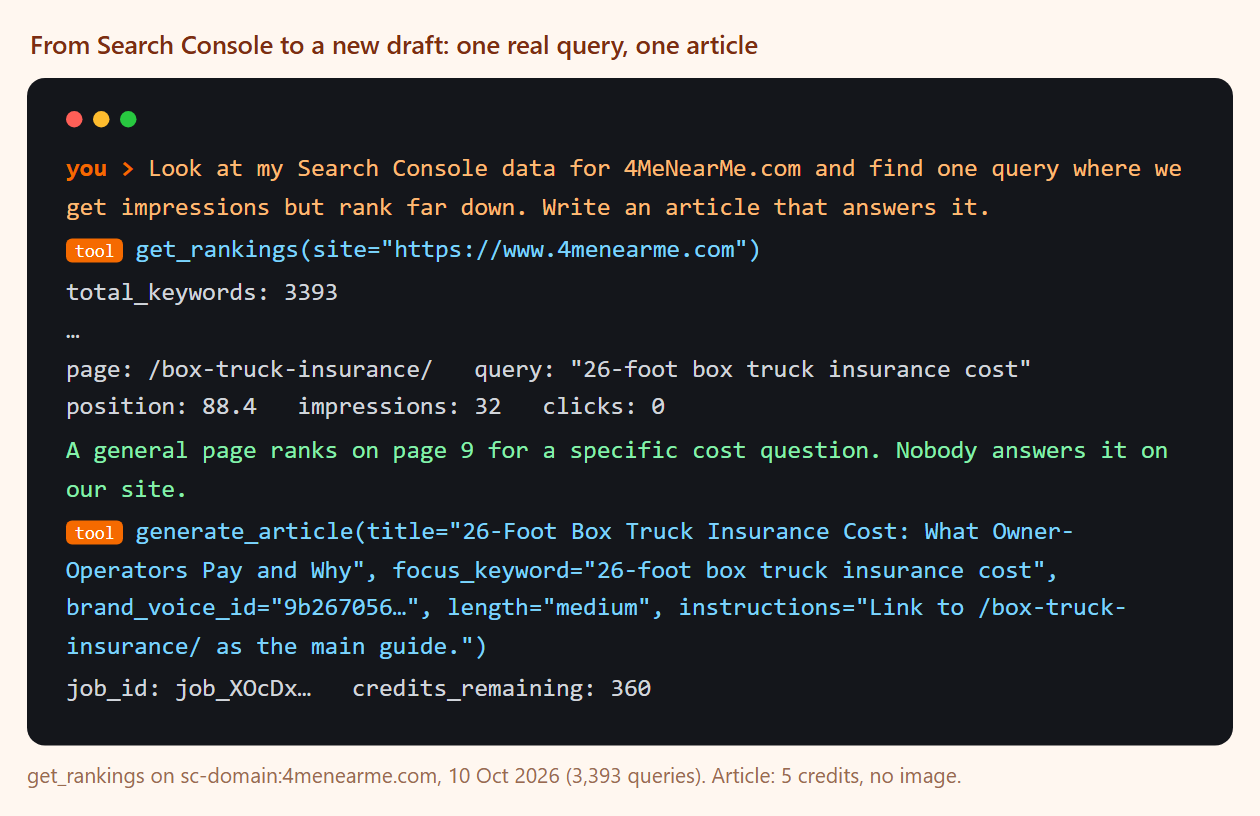
A general box truck page sat on page 9 for a specific cost question. That is a clear brief: one question, nobody on our site answering it directly. The Search Console and AI agent guide walks through this step in more detail.
Step 2: how does Claude write the article?
Claude passed the query to generate_article with the site's brand voice id and an instruction to link to the existing box truck page:
generate_article(
  title="26-Foot Box Truck Insurance Cost: What Owner-Operators Pay and Why",
  focus_keyword="26-foot box truck insurance cost",
  brand_voice_id="9b267056…",
  length="medium",
  instructions="Link to /box-truck-insurance/ as the main guide.")
The result: 1,151 words, H2 sections for cost drivers, a table of the four policies involved, numbered steps to lower the premium, and an FAQ. It cost 5 credits (no image).
It was not perfect. The intro says "see this box truck insurance guide" without a link in that sentence; the link ended up in the FAQ. One read-through before publishing catches this kind of thing.
Step 3: how does Claude get it onto the site?
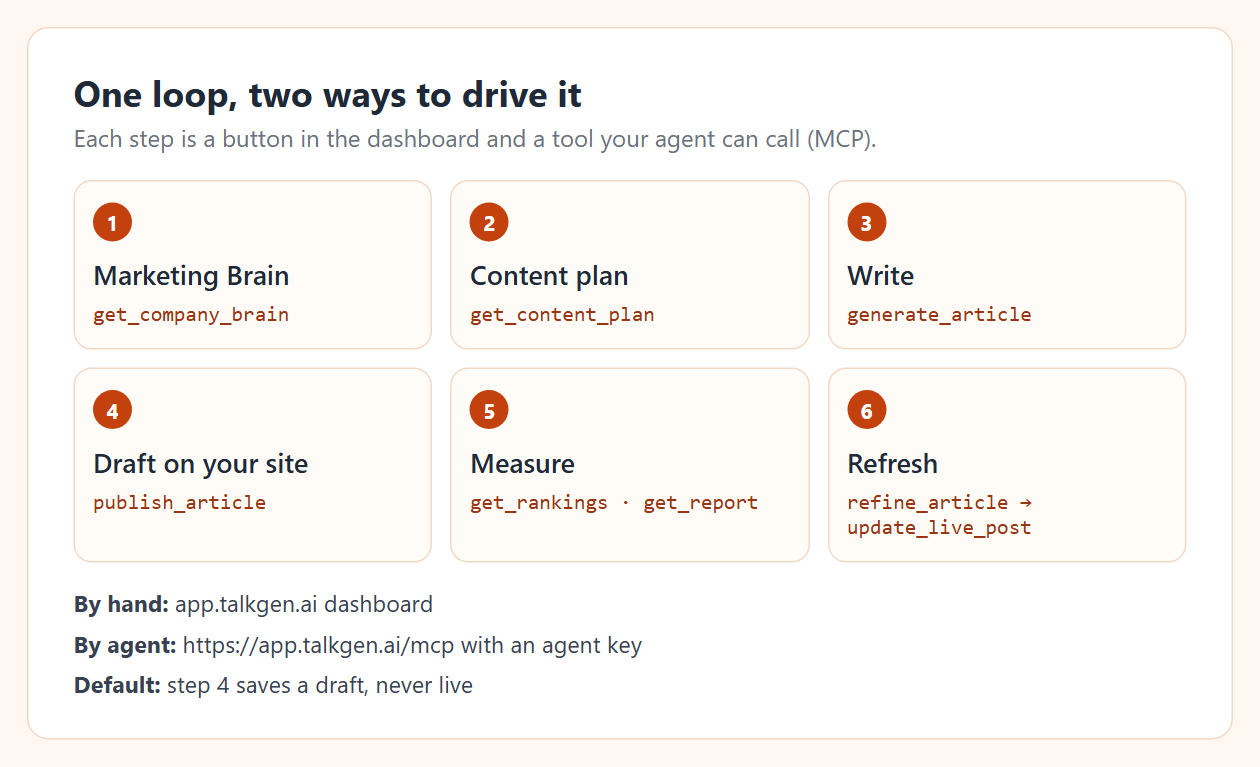
publish_article saved it to WordPress as a draft (post 22551). Drafts are the default for agents, so nothing goes live without a person. If you later improve the article, refine_article rewrites it from one instruction (2 credits) and update_live_post pushes the new text into the same post. The full tool list is in the MCP tools reference.
Which prompts work best?
These are the prompts we reuse. Each one names the site, the data source and the output.
| Goal | Prompt |
|---|---|
| Find a quick win | "Read my Search Console data for example.com. Find 3 queries with impressions where we rank below 20, and tell me which existing page ranks for each." |
| Check before writing | "Before writing, list my existing articles about [topic] and check the live site for a page on it." |
| Write one | "Write a medium article answering [query] in my site's brand voice. Link to [page]. Save it as a draft." |
| Find what AI assistants send traffic to | "Show me which of my pages got visits from ChatGPT last month, next to their Google position." |
| Improve one | "Refine [article]: add a short section on [question]. Keep everything else." |
The last two connect SEO with AI search. Our LLM SEO guide shows what that data looked like on our site, and it was not what Google rankings suggested.
Is Claude Code or Claude Desktop better for SEO?
Both use the same tools. Claude Code suits people who already work in a terminal or want to script a weekly run. Claude Desktop suits marketers who want a chat window; our Claude for marketing guide is written for that setup. For a site you also manage in WordPress, the WordPress MCP guide shows what lands in the editor.
Try it in 5 minutes
- Get a free agent key: app.talkgen.ai/connect-agent. No card.
- Add it to Claude Code with the command in Connect Claude Code.
- Ask Claude:
Check my TalkGenAI credits and list my connected sites. Then suggest one article
my site is missing, explain why, and wait for my OK before writing it.
Last updated: 2026-10-10