Automate the repeatable SEO work: finding what to write from your search data, writing drafts in your brand voice, adding images, schema and links, and measuring results. Keep two decisions human: whether a topic is really new for your site, and when a page goes live. When we automated our own pipeline, every failure we hit was silent. Nothing threw an error; the output just looked fine.
By Yaniv Mizrahi, founder of TalkGenAI. Every example on this page happened in our own pipeline or on our own site, 4MeNearMe.com, in October 2026.
Which SEO tasks should an agent do?
This is our own split, the one we run today:
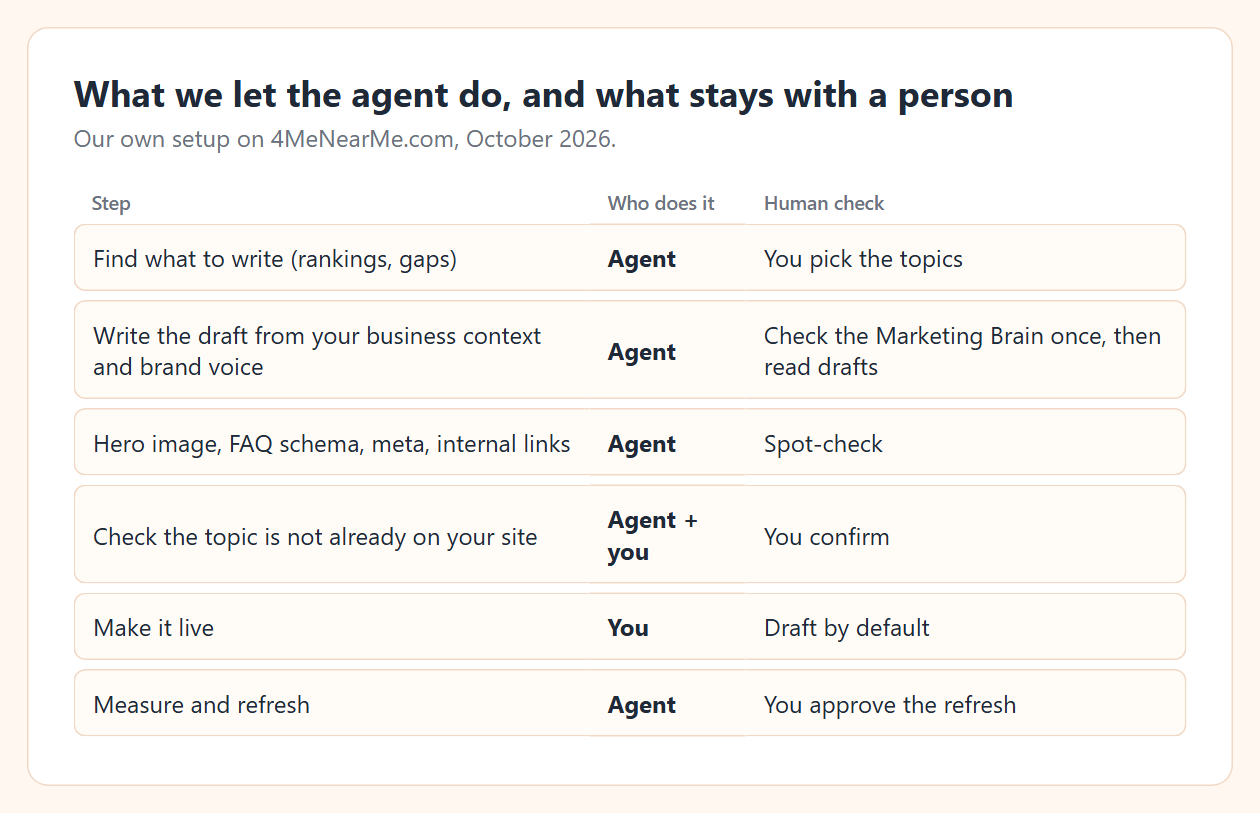
| Step | Who does it | Human check |
|---|---|---|
| Find what to write (rankings, gaps) | Agent | You pick the topics |
| Write the draft from your business context and brand voice | Agent | You check the Marketing Brain once, then read drafts |
| Hero image, FAQ schema, meta, internal links | Agent | Spot-check |
| Check the topic is not already on your site | Agent and you | You confirm |
| Make it live | You | Draft by default |
| Measure and refresh | Agent | You approve the refresh |
The one setup step that pays off most is the Marketing Brain: what you sell, what you do not sell, and your brand voice. An unattended agent writes from it, so it stays on your business and not only on the keyword. Read it once and fix it if it is wrong; the agent cannot fix a business description it does not know is wrong.
What broke when we automated it?
Three real failures. None of them raised an error.
1. The agent wrote a topic the site already had
We asked for a food truck insurance checklist. The agent checked list_articles, found nothing, wrote the article and saved the draft. WordPress gave it the slug food-truck-insurance-2.
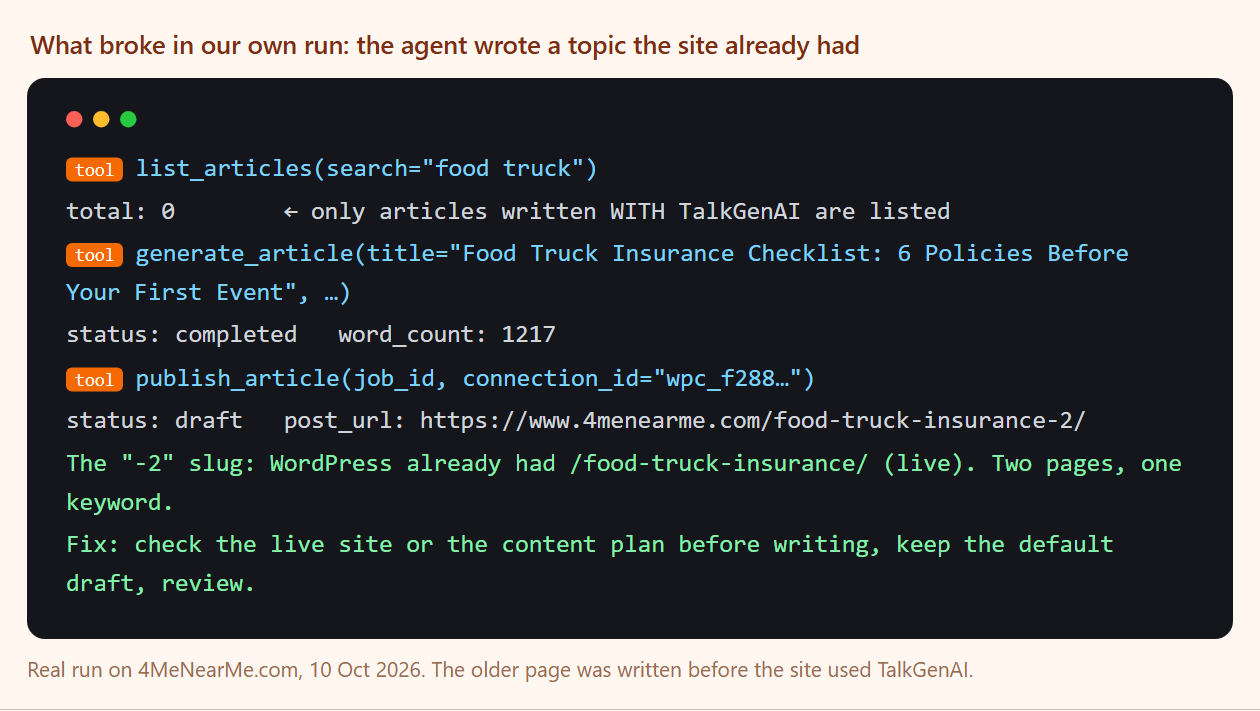
The site already had a live /food-truck-insurance/ page, written before it used TalkGenAI. list_articles only knows articles written with TalkGenAI, so the agent had no way to see it. Two pages on one keyword compete with each other in Google.
Fix: before writing, have the agent check the live site (search it, or read the sitemap) and work from the content plan, which is built against the pages your site already has. Keep the draft default so a person sees the duplicate before Google does.
2. The article asked for a link and did not put it where it said
We told the agent to link a new box truck article to our main /box-truck-insurance/ guide. The intro says "see this box truck insurance guide" with no link in that sentence. The link landed in the FAQ instead.
Fix: one read-through per draft, or a refine instruction such as "add the link to /box-truck-insurance/ in the intro sentence that mentions the guide" (2 credits).
3. A cheaper model silently dropped answers
In our own pipeline we swapped two classification steps from Claude Haiku 4.5 to Haiku 5.5 to save money. With our existing max_tokens limit, 10 of 15 answers came back cut off. The step was built to keep going on a bad answer, so the cut-off ones passed through as if they were fine. Raising the limit fixed it: 0 lost.
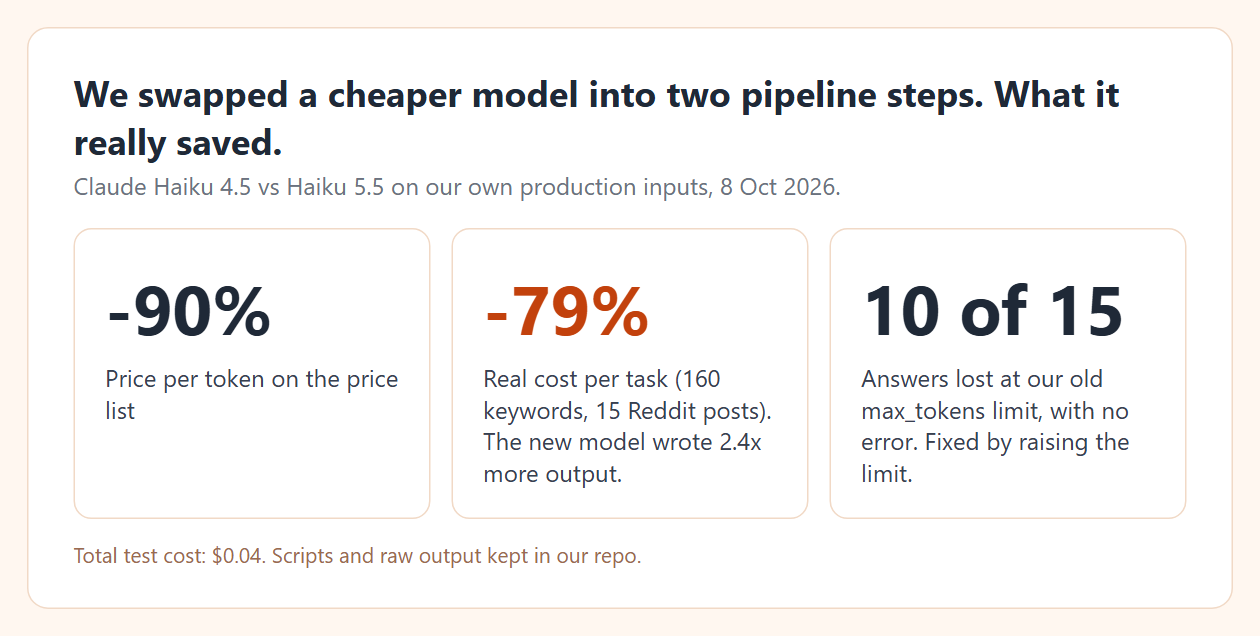
The saving was real but smaller than the price list: the new model is about 90% cheaper per token and wrote 2.4 times more output, so the cost per task fell 79% (160 keyword classifications and 15 Reddit relevance checks).
Fix: after any model change, count outputs against inputs, not only errors.
How much does automated SEO cost per article?
In TalkGenAI, an article is 5 credits, or 8 with a hero image. A refine is 2. Reading data and publishing are free. Our three test articles for these guides, plus one refine, used 23 credits. Plan allowances are on Credits and plans.
How do I set up the automation?
Two ways, same loop:
- Scheduled from the dashboard. Build a content plan, give cards dates, and choose whether finished articles go to a site as drafts or live.
- From your own agent. Connect Claude Code or another MCP client (Connect your AI agent) and give it the loop as a standing instruction. Our weekly content routine with Claude is a ready-made version for non-developers. What an AI SEO agent does step by step is on its own page.
Either way, start from data. The Search Console and AI agent guide shows how to pick topics from your own rankings, and the SEO blog writer guide covers the writing settings.
Try it in 5 minutes
Get a free agent key at app.talkgen.ai/connect-agent, connect Claude, and paste:
Before writing anything: list my connected sites and my open content plan cards.
For the first card, check whether my live site already has a page on that topic.
If not, write it and save it as a draft. Report what you checked.
Last updated: 2026-10-10