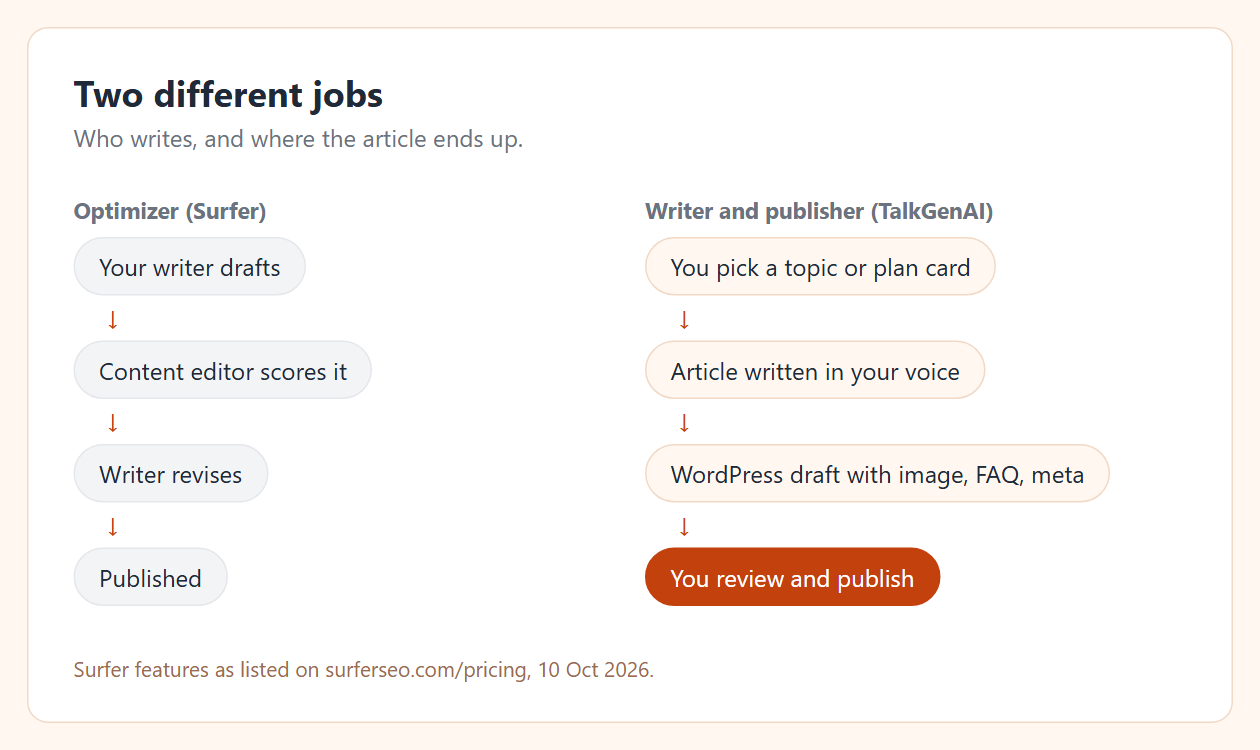
Yes, if your problem is "nobody has time to write", not "our writers need guidance". Surfer is built around a content editor that scores a draft against the pages already ranking, so a person writes and Surfer guides. TalkGenAI is built the other way round: it writes the full article in your brand voice and publishes it to your WordPress site as a draft, and a person reviews. If you have writers, Surfer or another optimizer is likely the better fit. If you do not, a writer-and-publisher is.
By Yaniv Mizrahi, founder of TalkGenAI. Surfer details were checked on surferseo.com on 10 October 2026. We make TalkGenAI, so read this with that in mind; we tried to say where Surfer is the better choice.
What does Surfer do well?
From Surfer's pricing page on 10 October 2026:
- A content editor that scores your draft against the pages already ranking for the keyword. Plans include a set number of documents you can create or optimize (120 a month on Discovery, 360 on Standard).
- Surfy, an AI writing assistant, and a humanizer, listed on every plan.
- AI search tracking of prompts across ChatGPT, Perplexity, Google AI Mode, AI Overviews and Gemini on Standard and above.
- A WordPress integration on Standard and above, plus Google Docs and a Chrome extension for writers.
- Plans from $49 to $299 a month billed yearly (Discovery, Standard, Pro, Peace of Mind), with Enterprise on request.
For a team with writers, that is a strong setup: the writers keep control, and the editor tells them what the top results cover.
What does TalkGenAI do instead?
It writes and publishes. You give a topic or let it work from a content plan; it writes the article in your brand voice, adds a hero image, FAQ schema, meta description and internal links, and saves it to WordPress.
The writing starts from the Marketing Brain: a stored description of what your business sells and does not sell, and a brand voice learned from your own site. Surfer's editor guides a person who already knows the business; TalkGenAI needs that knowledge written down, so it keeps it. On our run, the agent read it before writing: the business context came from the site, the voice in force was the one learned from 4MeNearMe.com, and the mismatch check came back false. How it works is on the Marketing Brain page.
Here is what one run produced on our own site:
| Our run, 10 October 2026 | |
|---|---|
| Request | Mobile pet groomer insurance, medium length, hero image, site's brand voice |
| Output | 1,230 words, question-style H2s, a comparison table, numbered buying steps, 4 FAQs with schema |
| Where it went | WordPress draft with the featured image set (post 22545) |
| Cost | 8 credits |
The full run is in the WordPress MCP guide, and the writing settings are in the SEO blog writer guide.
How do they compare?
| Surfer | TalkGenAI | |
|---|---|---|
| Who writes | Your writer, guided by the content editor (an AI assistant helps) | TalkGenAI, from your Marketing Brain (business context and brand voice) |
| Publishing | WordPress integration on Standard and up | Publishes to WordPress as a draft on every plan; Webflow, Shopify and Wix on request |
| Planning | Topic and keyword research tools | A content plan built from your site, with keyword, volume and outline per article |
| AI search | Tracks prompts across AI engines | Reports real visits from ChatGPT, Perplexity, Claude and Gemini from your own Google Analytics; AI citation monitoring (invite-only today) |
| Agents | Not checked for this page | MCP server: Claude, Cursor and other agents can write and publish |
| Price | $49 to $299 a month, billed yearly | $49 to $299 a month, billed monthly (pricing) |
| Best for | Teams with writers who want a quality bar | Small teams without a writer who want articles on the site |
The AI search rows measure different things. Tracking prompts tells you whether an assistant mentions you. Analytics visits tell you whether people actually clicked through. On our own site, AI visits went almost entirely to one page; see the LLM SEO guide. The LLM SEO tools comparison lists the prompt trackers with prices.
Who should stay with Surfer?
- You have in-house or freelance writers and want consistent on-page quality.
- You optimize many existing pages and want audits and content scores.
- You want to track how often AI engines mention you for a fixed list of prompts.
Other optimizers that list makers usually compare with Surfer include Frase, Clearscope, MarketMuse and NeuronWriter. They solve the same "guide my writer" problem.
Who should switch to a writer-and-publisher?
- Nobody on the team has time to write each week.
- You want articles on your WordPress site, not documents to copy over.
- You want to run it from an AI agent. See what an AI SEO agent does.
Try it in 5 minutes
Create a free account, connect WordPress and write one article on a topic you would have given a writer. No card; free credits cover about three articles. Compare the draft with what your current process produces.
Last updated: 2026-10-10